
Thêm 1 skin giao diện kiểu cũ nữa
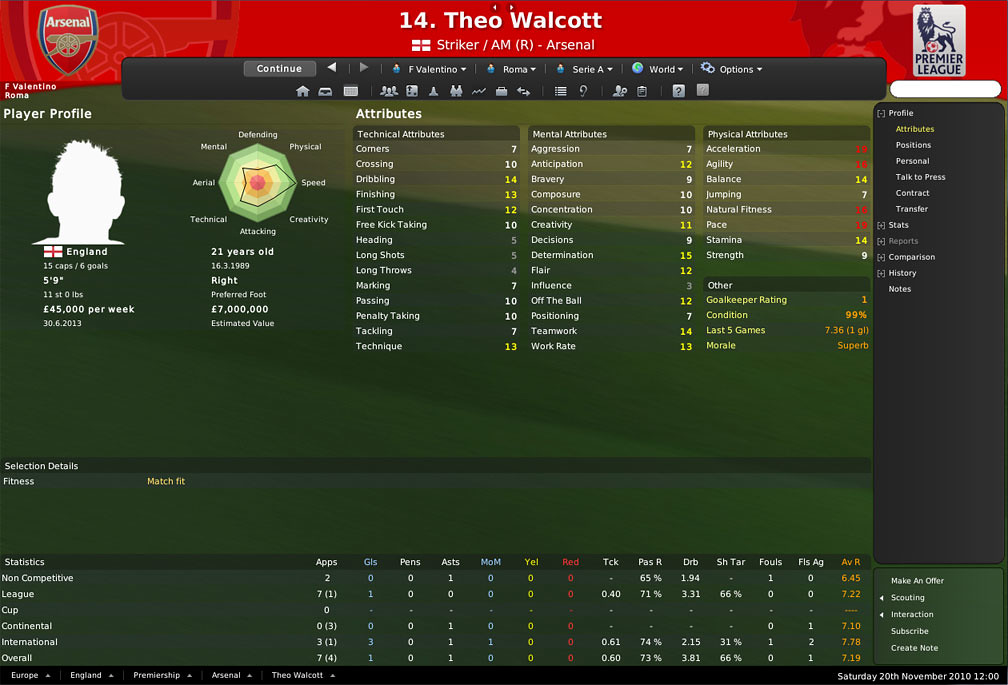
Screenshots:
 Installation Instructions:
If you cannot find your user data folder:Download the skin and follow the steps below to get it into your game:
Extract the file (using either 7-Zip for Windows or The Unarchiver for Mac).
Copy the folders you extracted into your skins folder this is by default (you may need to create the skins folder if it doesn’t already exist):
Win Vista/7: C:\Users\<username>\Documents\Sports Interactive\Football Manager 2011\skins
Win 2000/XP: C:\Documents and Settings\<username>\My Documents\Sports Interactive\Football Manager 2011\skins
Win 98/ME: C:\My Documents\Sports Interactive\Football Manager 2011\skins
Mac OS X: /Users/<username>/Documents/Sports Interactive/Football Manager 2011/skins
To select the skin in game you will need to:You can find the location of it from within FM2011, load the game go into the preferences menu and at the bottom will be a section called User Data Folder, this will list the current location and will also allow you to change it or set it back to the default location:
You need to ensure you didn’t add an extra folder to the layout, when you copy the folder for your skin into the skins folder and go into the folder for your skin it should look something like this:
In the above example you will note that within the skins folder is a folder called base2011, and when you open the base2011 folder you see three more folders and a xml file called base2011 – if your skins folder looks like this (with the skin_name.xml file inside one skin_name folder) then you have installed the skin correctly.
- # load the game, and go into the preferences -> Display and Sound menu
- # untick ‘Use Skin Cache’ and tick ‘Always Reload Skin On Confirm’ then select confirm and
- #select the skin from the drop down menu, select confirm again and your new skin should now display. (Once the skin is loaded you can turn the skin cache back on and untick the Always Reload button.)
Copy nguyên văn của nó luôn cho anh em nào chưa biết install skinDownload:
Mã:http://www.filesonic.com/file/35125139/ http://www.fileserve.com/file/8nNA3s6 http://www.mediafire.com/?n1ser7mirq8babb
Nguồn: http://www.fmscout.com
Chủ đề tương tự:
Hiển thị kết quả từ 1 tói 5 trong tổng số 5
Chủ đề: Flex 11 skin for FM11
-
26-11-2010, 11:56 AM #1

 Em tên là Hồng. Hãy gọi em là sịp hồng
Moderator
Em tên là Hồng. Hãy gọi em là sịp hồng
Moderator
- Ngày tham gia
- 09 Dec 2009
- Đến từ
- Neverland
- Số bài viết
- 6,748
Flex 11 skin for FM11

-
27-11-2010, 12:26 PM #2
FMVN's member
HLV nghiệp dư
- Ngày tham gia
- 20 Nov 2008
- Số bài viết
- 53
skins này mình sài bị lỗi việt hoá hic.....
OlE Goal gOal goAl
-
28-11-2010, 09:56 AM #3
Refresh
Thành viên danh dự
- Ngày tham gia
- 04 Oct 2007
- Đến từ
- Nothingness
- Số bài viết
- 562
Căn bản là ko phải lỗi việt hóa, mà skin này dùng font mặc định của FM11 cái font này hỗ trợ tiếng việt
 , hoặc là dùng fonts khác nhưng cũng chẳng hỗ trợ font tiếng việt.
Cách đơn giản là thay font .
.

-
31-12-2010, 01:57 AM #4
FMVN's member
HLV tuyển trẻ U23
- Ngày tham gia
- 25 Nov 2006
- Số bài viết
- 334
Tìm nửa tiếng ko thấy nút Save match để tham dự event Goal T_T
-
01-01-2011, 01:24 AM #5
FMVN's member
HLV tập sự
- Ngày tham gia
- 15 Dec 2010
- Số bài viết
- 5
làm sao để thay font cho skin vậy bạn


 Trả lời kèm theo Trích dẫn